Clean Code Principles for Beginners: Examples & Checklist
Your project may run successfully, but can you explain the code clearly in viva? Can your teammate understand your files without asking you ten questions? Can you fix one bug without breaking three other modules?
That is where clean code matters.
Clean code means code that is easy to read, easy to understand, easy to test, and easy to modify. For beginners and final-year students, it is not just a professional habit. It directly affects debugging, project documentation, GitHub presentation, teamwork, and viva confidence.
This guide explains the most important clean code principles for beginners with examples, common code smells, useful tools, and a final-year project cleanup checklist.
Quick Answer: What Are Clean Code Principles?
Clean code principles are practical rules that help developers write readable, maintainable, and understandable code.
The most important clean code principles for beginners are:
- Meaningful naming
- Small functions
- Single responsibility
- DRY
- KISS
- YAGNI
- Consistent formatting
- Useful comments
- Input validation
- Clear error handling
- Regular refactoring
In simple words, clean code is code that your future self, your teammate, or your teacher can understand without confusion.
Why Clean Code Matters for Students
Many beginners think clean code is only for professional developers. That is not true. Clean code matters from your first serious project because messy code becomes difficult to explain, debug, and improve.
For example, imagine a Library Management System where login, book issue, fine calculation, admin dashboard, database connection, and report generation are written inside one file. The project may work, but it becomes difficult to maintain. If your teacher asks how fine calculation works, you may struggle to find the exact logic.
Clean code helps you:
- Explain modules confidently in viva
- Reduce bugs during last-minute changes
- Improve project reports and documentation
- Make GitHub repositories look more professional
- Collaborate better in group projects
- Build stronger coding habits for placements
Poor software quality is also a serious industry problem. CISQ estimated that the cost of poor software quality in the U.S. reached at least $2.41 trillion in 2022, with accumulated technical debt estimated at about $1.52 trillion.
1. Use Meaningful Names
Good names make code self-explanatory. A common beginner mistake is using names like x, data1, temp, or abc.
Bad example:
let x = 500;
let y = 10;
let z = x - y;
Better example:
let totalAmount = 500;
let discountAmount = 10;
let finalAmount = totalAmount - discountAmount;
In student projects, use names that match the module:
|
Module |
Better Naming Examples |
|
Student Management |
studentName, rollNumber, courseName |
|
Library System |
bookIssueDate, returnDate, fineAmount |
|
E-Commerce |
orderStatus, cartTotal, paymentMode |
|
Attendance System |
attendancePercentage, presentDays |
A good name should answer one question: “What is this used for?”
2. Keep Functions Small and Focused
A function should do one clear task. If one function handles login validation, database query, password checking, session creation, and dashboard redirection, it becomes difficult to test and explain.
Instead of one large function, split the logic:
validateLoginInput();
findUserByEmail();
checkPassword();
createUserSession();
redirectToDashboard();
This makes the code easier to read and easier to explain in a project report. If you cannot explain a function in one sentence, it is probably doing too much.
3. Follow Single Responsibility Principle
Single Responsibility Principle means one file, class, function, or module should have one main responsibility.
For example, in an Online Food Ordering System:
|
Module |
Responsibility |
|
Cart Module |
Add, update, and remove cart items |
|
Order Module |
Place orders and track order status |
|
Payment Module |
Store payment details |
|
Admin Module |
Manage products, categories, and orders |
|
User Module |
Manage login, profile, and order history |
When responsibilities are separated, your project becomes easier to extend. If you need to change order-status logic, you should not have to edit product-management code.
4. Use DRY: Do Not Repeat Yourself
DRY means repeated logic should not be copied everywhere. If the same GST calculation, validation, or database connection is repeated in five files, one change must be made five times.
Bad approach:
$total = $price + ($price * 0.18);
If this logic is copied everywhere, changing the tax rate later becomes risky.
Better approach:
function calculateFinalPrice($price) {
return $price + ($price * 0.18);
}
Use DRY for:
- Price calculation
- Date formatting
- Email validation
- Password hashing
- Database connection
- Report generation
5. Follow KISS and YAGNI
KISS means “Keep It Simple.” A simple working solution is better than a complicated solution you cannot explain.
YAGNI means “You Aren’t Gonna Need It.” Do not add features just because they sound advanced.
For example, if your Attendance Management System only needs student login, teacher login, attendance marking, and monthly reports, do not add AI prediction, blockchain verification, and unnecessary APIs unless your project scope actually requires them.
Clean code is not clever code. Clean code is clear code.
6. Write Useful Comments, Not Obvious Comments
Comments should explain why something is done, not repeat what the code already says.
Bad comment:
// Add 1 to count
count = count + 1;
Better comment:
// Increase failed login count to temporarily block repeated invalid attempts
failedLoginCount = failedLoginCount + 1;
Use comments for complex business rules, security decisions, validation logic, and temporary limitations. Do not use comments to hide messy code. First improve the code, then comment only where needed.
7. Format Code Consistently
Formatting does not change what code does, but it changes how easily humans can read it. Google’s style-guide documentation notes that large codebases are easier to understand when code follows a consistent style.
Clean formatting includes:
- Proper indentation
- Blank lines between logical sections
- Consistent braces
- Grouped imports
- Consistent file names
- No very long lines
- No unused code
Use your IDE formatter before submitting your project or uploading it to GitHub.
8. Validate Inputs and Handle Errors Clearly
Clean code is not only about appearance. It also means writing safe and reliable logic.
Every project should validate user input:
|
Input Type |
Validation Example |
|
Name |
Required, alphabetic characters |
|
|
Valid email format |
|
Password |
Minimum length and strength |
|
Phone |
Correct number of digits |
|
Price |
Numeric and non-negative |
|
File Upload |
Allowed type and size |
|
Date |
Valid date range |
Error handling should also be clean. Do not show raw database errors to users. OWASP recommends returning generic user-facing errors while logging technical details server-side for investigation.
Better user messages include:
- “Invalid email or password.”
- “Book is already issued.”
- “Please upload a valid PDF file.”
- “You are not allowed to access this page.”
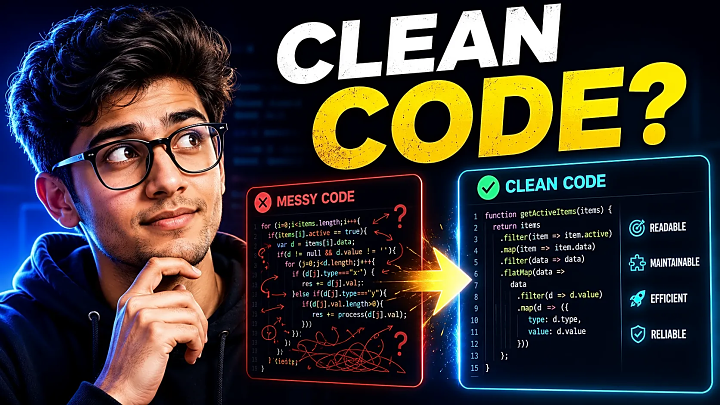
Before and After: Cleaning a Student Login Function
Messy version:
function login($email, $pass, $conn) {
$q = mysqli_query($conn, "SELECT * FROM users WHERE email='$email'");
$u = mysqli_fetch_assoc($q);
if ($u && $u['password'] == $pass) {
$_SESSION['user'] = $u['id'];
header("Location: dashboard.php");
} else {
echo mysqli_error($conn);
}
}
Problems:
- No input validation
- Unsafe query style
- Plain password comparison
- Raw error display
- Login, database, session, and redirect mixed together
Cleaner structure:
function validateLoginInput($email, $password) {
return !empty($email) && !empty($password) && filter_var($email, FILTER_VALIDATE_EMAIL);
}
function findUserByEmail($conn, $email) {
// Use prepared statements in actual implementation
}
function isPasswordCorrect($password, $hashedPassword) {
return password_verify($password, $hashedPassword);
}
function createLoginSession($userId) {
$_SESSION['user_id'] = $userId;
}
The cleaner version separates responsibilities. It is easier to test, easier to debug, and easier to explain during viva.
Common Code Smells Beginners Should Fix
|
Code Smell |
Meaning |
Fix |
|
Long function |
One function does too many things |
Split into smaller functions |
|
Duplicate code |
Same logic copied in many places |
Create reusable function |
|
Large file |
One file contains many modules |
Separate by feature/module |
|
Unclear names |
Variables do not explain purpose |
Rename clearly |
|
Hard-coded values |
Values are fixed inside code |
Use config/constants |
|
Raw errors |
Technical errors shown to users |
Show clean messages, log details |
|
Dead code |
Unused files or functions |
Remove before submission |
Tools That Help Beginners Write Clean Code
|
Tool |
Best For |
|
VS Code Formatter |
Basic formatting |
|
Prettier |
JavaScript, HTML, CSS formatting |
|
ESLint |
JavaScript code quality |
|
Black |
Python formatting |
|
PHP CS Fixer |
PHP coding standards |
|
Git |
Version control |
|
GitHub |
Project presentation and code review |
You do not need to use every tool. Start with formatting, Git commits, and a clean folder structure.
Clean Code Checklist for Final-Year Project Submission
Before submitting your project, check these points:
- File names are clear
- Variables and functions have meaningful names
- Large functions are broken into smaller functions
- Duplicate logic is removed
- Database connection is stored separately
- Forms have proper validation
- Error messages are user-friendly
- Passwords are not stored in plain text
- Admin and user modules are separated
- Unused files are removed
- Code is formatted properly
- README includes setup steps
- Database import instructions are included
- Screenshots are added if required
- GitHub repository does not expose private credentials
- Main user flows are tested: login, signup, add, edit, delete, search, logout
FAQ: Clean Code Principles for Beginners
What are the main clean code principles?
The main clean code principles are meaningful naming, small functions, single responsibility, DRY, KISS, YAGNI, consistent formatting, useful comments, validation, error handling, and refactoring.
How do beginners write clean code?
Beginners can write clean code by using clear names, writing small functions, avoiding duplicate logic, formatting code, validating inputs, and reviewing code after every feature.
What are examples of bad code?
Bad code usually has unclear names, long functions, repeated logic, mixed responsibilities, hard-coded values, missing validation, and raw errors shown to users.
What is DRY in programming?
DRY means “Do Not Repeat Yourself.” It means repeated logic should be written once and reused through functions, classes, or modules.
What is KISS in coding?
KISS means “Keep It Simple.” It encourages developers to write simple, clear, and understandable solutions instead of unnecessary complexity.
What is YAGNI?
YAGNI means “You Aren’t Gonna Need It.” It reminds developers not to build features before they are actually required.
How do I refactor messy code?
Start by renaming unclear variables, splitting long functions, removing duplicate logic, separating modules, adding validation, improving error handling, and testing the main flow after every change.
Is clean code important for final-year projects?
Yes. Clean code helps students explain project flow, reduce bugs, improve documentation, prepare for viva, and present source code professionally.
Conclusion
Clean code is one of the most useful habits a beginner developer can learn. It is not about writing perfect or complex code. It is about writing code that is readable, simple, organized, safe, and easy to improve.
For final-year students, clean code directly improves project quality, GitHub presentation, report writing, debugging, and viva confidence.
Start with one messy module in your current project. Rename unclear variables, split large functions, remove duplicate logic, add validation, format the code, and update your README. Small cleanup steps can make your entire project easier to understand, submit, and present.
Want to practice clean code on real projects? Explore FileMakr’s final-year project source code, final year project ideas, and beginner-friendly coding guides to build and present your project with confidence.