OCR Web Application Final Year Project: Complete Guide
Choosing a final-year project that is technically interesting, practical and still manageable within a college semester can be difficult. A basic CRUD application may be easy to develop, but it often provides limited scope for demonstrating advanced technologies.
An OCR Web Application Final Year Project solves this problem by combining web development, image processing and Optical Character Recognition into one practical application.
Instead of manually typing text visible inside an image or screenshot, an OCR application identifies the characters and converts them into editable digital text. OCR is widely used for digitising scanned documents, receipts, forms and other image-based information.
For final-year students, the project provides opportunities to explain frontend development, backend processing, OCR technology, APIs, image handling, database integration and system testing within a single project.
Quick Answer: What Is an OCR Web Application Final Year Project?
An OCR Web Application is a software project that uses Optical Character Recognition to identify text inside images or screenshots and convert it into machine-readable text.
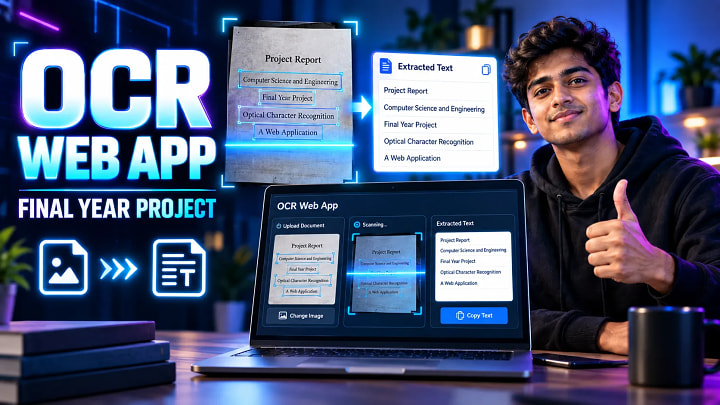
A practical final-year implementation can allow a user to enter a webpage URL, capture a screenshot, crop the required section and perform OCR on that selected area using Tesseract.js. The recognised text can then be copied, stored or exported.
The FileMakr implementation uses technologies including Node.js, JavaScript and MongoDB and supports features such as screenshot capture, interactive cropping, English and Hindi OCR, confidence scores and PDF export.
What Is Optical Character Recognition?
OCR stands for Optical Character Recognition.
Normally, text visible inside a JPG, PNG, scanned document or screenshot exists as pixels rather than editable characters. A computer cannot treat those pixels in the same way it treats text typed into a document.
OCR analyzes the visual information and converts recognizable characters into machine-readable text.
For example:
Input image:
“Final Year Project 2026”
OCR output:
Final Year Project 2026
The extracted result can subsequently be searched, copied, edited, stored or processed by another application.
How Does the OCR Web Application Work?
The application follows a straightforward processing pipeline.
1. User Provides a Website URL
The user enters the address of the webpage from which text must be extracted.
2. Website Screenshot Is Captured
The system captures the webpage as an image.
Instead of applying OCR to the entire website, the application presents the screenshot to the user.
3. User Selects the Required Region
An interactive crop interface allows the user to choose the exact part containing relevant text.
Cropping improves usability because headers, advertisements, images and unnecessary interface elements can be excluded.
4. Image Is Prepared for OCR
The cropped region becomes the OCR input.
Image quality significantly affects OCR performance. Common preprocessing techniques used by OCR systems include contrast improvement, grayscale conversion, denoising, resizing and thresholding.
5. Tesseract.js Performs OCR
Tesseract.js brings Tesseract-based text recognition to browser and Node.js environments using WebAssembly.
The OCR worker analyzes the selected image and produces detected characters, words and confidence information.
6. Recognised Text Is Displayed
The extracted content is shown inside the web application.
Users can inspect the result and correct recognition errors where necessary.
7. Output Is Copied or Exported
The final result can be copied to the clipboard or exported for later use.
OCR Final Year Project Technology Stack
A good final-year implementation should use technologies that are understandable during viva while still demonstrating a complete software workflow.
|
Component |
Technology |
Purpose |
|
Frontend |
HTML, CSS, JavaScript |
User interface |
|
Backend |
Node.js / Express.js |
Application processing |
|
OCR Engine |
Tesseract.js |
Text recognition |
|
Database |
MongoDB |
Optional OCR-history storage |
|
Image Input |
Website screenshot/cropped image |
OCR source |
|
Language |
JavaScript |
Application logic |
|
Export |
PDF/text output |
Saving extracted content |
|
Deployment |
Web hosting/Firebase-compatible setup |
Online availability |
Tesseract.js can run both in the browser and in Node.js environments, making it particularly suitable for JavaScript-based OCR projects.
Major Modules of the OCR Web Application
URL Input Module
Accepts the target webpage URL and validates the provided address.
Screenshot Capture Module
Creates an image representation of the specified webpage.
Image Crop Module
Allows users to select only the text-containing area required for recognition.
OCR Processing Module
Passes the selected image through the OCR engine.
This is the core module responsible for character recognition.
Language Selection Module
A multilingual OCR project can provide language-selection support.
The FileMakr project supports English and Hindi OCR workflows.
Confidence Score Module
OCR output is not always perfectly accurate.
A confidence indicator provides additional information about how strongly the OCR engine recognized the text.
Result Module
Displays the extracted content in readable form.
Typical actions can include:
- Copying text
- Editing text
- Clearing results
- Processing another image
Export Module
Extracted information can be exported as a document such as a PDF where implemented.
Database Module
MongoDB can optionally maintain OCR history, captured records or related metadata.
Real-World Applications of OCR
OCR is not limited to academic projects.
The same technology is used in several real-world workflows including:
- Digitising printed documents
- Extracting data from invoices
- Reading receipts
- Converting scanned forms into searchable information
- Processing screenshots
- Digitising textbook pages
- Recognising text from signs
- Accessibility applications
- Archiving old documents
OCR essentially creates a bridge between image-based information and software systems that need searchable or editable text.
For students, explaining these applications during a project demonstration makes the project easier to justify academically.
Why Is OCR a Good Final Year Project?
An OCR web application is particularly suitable for B.Tech, BCA, MCA, BE, BSc CS and related computer-science students because it combines several technical domains.
Students get exposure to:
Web development: Building the frontend and backend application.
Image processing: Understanding how image quality affects recognition.
Computer vision concepts: Identifying visual characters and text regions.
Third-party libraries: Integrating Tesseract.js into a working system.
Database concepts: Storing OCR history or result metadata.
Software engineering: Designing modules and handling complete workflows.
Testing: Evaluating recognition against different images, fonts and languages.
The result is more demonstrable than a purely theoretical project because users can immediately see an input image being transformed into text.
Step-by-Step OCR Project Implementation Guide
Step 1: Define Project Requirements
Decide exactly what the OCR system will accept.
For example:
Website URL → Screenshot → Crop → OCR → Text → Export
Keeping the workflow clearly defined prevents unnecessary features from complicating the project.
Step 2: Build the Frontend
Create interfaces for:
- URL input
- Screenshot preview
- Crop selection
- OCR progress
- Extracted text
- Copy/export controls
Focus on responsiveness and straightforward navigation.
Step 3: Configure the Node.js Backend
Create the application server and required routes.
The backend can manage screenshot generation, application configuration and optional database operations.
Step 4: Integrate Screenshot Capture
Capture the requested webpage and return the screenshot to the frontend.
Handle invalid URLs and timeout errors properly.
Step 5: Implement Image Cropping
Provide an interactive selection interface.
Only the selected section should proceed to OCR processing.
Step 6: Integrate Tesseract.js
Install and configure Tesseract.js and create an OCR worker.
Tesseract.js documentation recommends creating a worker and reusing it when recognizing multiple images instead of recreating it for every recognition request.
Step 7: Add Language Support
Configure the OCR languages required by the project.
For an Indian academic project, adding Hindi alongside English can increase project relevance and demonstrate multilingual recognition.
Step 8: Display OCR Results
Show:
- Extracted text
- Recognition progress
- Confidence information
- Copy option
Provide clear error messages if the image contains unreadable content.
Step 9: Add Export Functionality
Allow recognized text to be converted into a useful downloadable format when required.
Step 10: Test the Application
Test against:
- Clear printed text
- Small text
- Low-resolution screenshots
- Coloured backgrounds
- English text
- Hindi text
- Mixed layouts
- Different font sizes
Record the observations because they provide valuable material for the project report and viva.
Common OCR Project Mistakes
Processing Poor-Quality Images
Blurred or extremely compressed images can significantly reduce recognition quality.
Performing OCR on the Entire Screenshot
Unnecessary visual elements can create recognition noise. Cropping the relevant portion generally produces a cleaner input.
Claiming 100% Accuracy
OCR accuracy depends on numerous factors including image quality, fonts, background, character spacing and language.
A project report should explain these limitations rather than claiming perfect recognition.
Ignoring Error Handling
Invalid links, screenshot failures and OCR-processing errors should generate proper user messages.
Adding Too Many Unrelated Features
Keep the core academic problem clear: extracting text from visual content.
Confusing OCR With PDF Parsing
Tesseract.js itself works primarily with images and does not natively perform PDF OCR. PDF workflows require additional handling or libraries.
Pro Tips for Improving the Project
Use cropping before OCR. Removing irrelevant visual content improves the recognition context.
Display processing progress. OCR can take time, so showing status information makes the application feel more professional.
Include confidence values. This makes the project technically more meaningful than simply showing extracted text.
Test multilingual input. English and Hindi create a better demonstration for an Indian final-year audience.
Maintain a testing dataset. Keep several screenshot samples with known expected output.
Measure OCR performance. Compare recognized text against expected text and document common failure cases.
Prepare architecture diagrams. A simple diagram showing User → Screenshot Engine → Crop Module → OCR Engine → Result → Export makes the workflow much easier to explain during viva.
Advantages and Limitations
Advantages
The system reduces manual typing, digitises visual information, converts screenshots into editable content and demonstrates real-world automation.
It can also be extended into document-management, accessibility, translation or intelligent document-processing applications.
Limitations
Recognition depends heavily on input quality.
Complex backgrounds, handwriting, unusual fonts, distorted characters and low-resolution images may reduce accuracy.
Therefore, OCR should be treated as a recognition technology rather than guaranteed perfect transcription.
Frequently Asked Questions
What is an OCR Web Application Final Year Project?
It is a web-based project that extracts text from images, screenshots or scanned visual information using Optical Character Recognition technology.
Which technology can be used for an OCR project?
A web version can use HTML, CSS, JavaScript, Node.js, Express.js, MongoDB and Tesseract.js.
What is Tesseract.js?
Tesseract.js is a JavaScript OCR library that brings Tesseract-based text recognition to browser and Node.js environments.
Can OCR extract Hindi text?
Yes, an OCR application can be configured with suitable language data to recognize Hindi and other supported languages.
Is OCR a good final-year project?
Yes. It combines web development, OCR, image processing, software engineering and practical automation, making it suitable for major or minor academic projects.
Can OCR recognize handwritten text?
OCR systems are generally strongest on clean printed text. Handwriting recognition may require more specialized recognition models, depending on the handwriting quality and chosen technology.
Does this OCR project require MongoDB?
MongoDB is useful when OCR results, history or related metadata need persistence, but OCR recognition itself does not inherently require a database.
Where can students get the OCR project report and source code?
FileMakr provides separate resources for the OCR Web Application project, including project documentation and runnable source-code options intended for academic learning, implementation and demonstration.
Conclusion
An OCR Web Application Final Year Project is a strong academic project for students who want to demonstrate more than basic database CRUD functionality.
The project solves a clear real-world problem: converting text trapped inside screenshots and images into editable digital information.
A practical implementation can combine website screenshot capture, interactive cropping, Tesseract.js-based OCR, multilingual recognition, confidence scoring, output copying, exporting and MongoDB persistence.
For students preparing the project, the most important approach is to understand the complete workflow rather than concentrating only on the code.
Learn how the screenshot is generated, why cropping matters, how OCR interprets the selected image, which factors affect recognition accuracy and how the extracted information is returned to the user.
That understanding will make both your project demonstration and final-year viva significantly stronger.