Smart Irrigation System Project Using IoT & ESP32: Complete Guide for Students
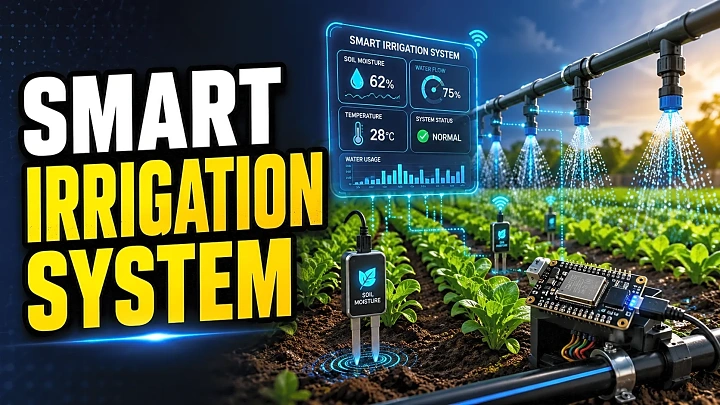
A Smart Irrigation System is an IoT-based project that automatically waters plants when soil moisture is low and stops the pump when enough water is supplied. For final-year students, it is a strong project because it combines sensors, ESP32, relay-based pump control, cloud database, dashboard, testing, and real-world water conservation.
Quick Answer: What Is a Smart Irrigation System?
A smart irrigation system uses a soil moisture sensor, ESP32 or Arduino, relay module, and water pump to automate irrigation. When the soil becomes dry, the controller turns the pump ON. When moisture reaches the required level, the pump turns OFF. Advanced versions include Firebase, Blynk, ThingSpeak, weather API, mobile alerts, and project reports with dashboard screenshots.
India’s focus on irrigation efficiency also makes this a relevant academic topic. Government data shows irrigation coverage increased from 49.3% to 55% of gross cropped area between FY16 and FY21, while Per Drop More Crop promotes water-use efficiency through micro-irrigation technologies.
Why Smart Irrigation Is a Good Final-Year Project
A smart irrigation system project is suitable for B.Tech, BE, BCA, MCA, BSc IT, electronics, and IoT students because it is practical, affordable, and easy to demonstrate.
It covers:
- IoT-based sensor monitoring
- Soil moisture-based irrigation control
- ESP32 or Arduino programming
- Relay and pump automation
- Cloud database integration
- Dashboard design
- Testing, report writing, and viva explanation
It also connects naturally with smart agriculture, precision farming, and water conservation. FileMakr already has a related smart agriculture guide covering IoT, ESP32, sensors, dashboard, source code, report format, and viva questions, making this article a strong topical cluster page.
Main Objectives of the Smart Irrigation System
The main objective is to reduce manual watering and improve water usage through automation.
Key objectives include:
- Measure soil moisture in real time.
- Detect dry, normal, and wet soil conditions.
- Turn the pump ON when moisture is below the threshold.
- Turn the pump OFF when the soil reaches the desired moisture level.
- Store readings with date and time.
- Show live moisture, temperature, humidity, and pump status on a dashboard.
- Alert users when the tank is empty or sensor data is abnormal.
Components Required with Estimated Cost
|
Component |
Purpose |
Approx. Cost in India |
|
ESP32 / NodeMCU |
IoT controller with Wi-Fi |
₹300–₹600 |
|
Arduino Uno |
Basic offline controller |
₹400–₹700 |
|
Capacitive soil moisture sensor |
Measures soil moisture |
₹150–₹300 |
|
Relay module |
Controls pump switching |
₹80–₹150 |
|
Mini water pump |
Supplies water |
₹150–₹400 |
|
DHT11/DHT22 |
Temperature and humidity |
₹100–₹350 |
|
Water-level sensor |
Detects tank level |
₹100–₹250 |
|
Rain sensor |
Avoids watering during rainfall |
₹100–₹250 |
|
Jumper wires, breadboard, pipe |
Connections and setup |
₹150–₹300 |
|
Firebase / Blynk / ThingSpeak |
Dashboard and data logging |
Free/paid plans |
For IoT projects, ESP32 is usually better than Arduino Uno because it includes Wi-Fi and Bluetooth support. Espressif’s documentation describes ESP32 as a Wi-Fi and Bluetooth SoC that can work as a standalone system or interface with other systems.
How the Smart Irrigation System Works
The working principle is simple:
- The soil moisture sensor reads the moisture level.
- ESP32 receives the analog sensor value.
- The value is converted into a moisture percentage.
- The controller compares it with a fixed threshold.
- If soil moisture is low, the relay turns the pump ON.
- If the soil becomes wet enough, the pump turns OFF.
- Data is uploaded to Firebase, Blynk, ThingSpeak, or MySQL.
- The dashboard displays live readings, pump status, and irrigation history.
A strong final-year project should not only switch the pump ON and OFF. It should also explain why the decision was taken, store logs, and show output through a dashboard.
Smart Irrigation System Circuit Diagram and ESP32 Pin Connections
Add a circuit diagram image in the final article with this alt text:
Alt text: Smart irrigation system circuit diagram using ESP32, soil moisture sensor, relay module, water pump, and dashboard.
Sample ESP32 pin connection table:
|
Module |
ESP32 Pin |
Notes |
|
Soil moisture sensor AO |
GPIO 34 |
Analog input |
|
Relay IN |
GPIO 26 |
Controls pump |
|
DHT11/DHT22 data |
GPIO 4 |
Temperature/humidity |
|
Water-level sensor |
GPIO 35 |
Analog input |
|
Rain sensor DO |
GPIO 27 |
Digital input |
|
Buzzer/LED alert |
GPIO 14 |
Optional alert |
|
VCC/GND |
3.3V/5V and GND |
Use proper voltage |
Important safety note: Do not power the water pump directly from ESP32 or Arduino. Use a relay module and an external power supply for the pump.
Soil Moisture Calibration Example
Calibration improves accuracy because soil type, sensor quality, and water level affect readings.
|
Condition |
Moisture Range |
Pump Action |
|
Dry soil |
0–35% |
Pump ON |
|
Normal soil |
35–60% |
Pump optional/OFF |
|
Wet soil |
Above 60% |
Pump OFF |
|
Sensor error |
No value/unstable value |
Alert |
For better durability, use a capacitive soil moisture sensor instead of a low-cost resistive sensor because resistive probes are more likely to corrode in wet soil.
Source Code Flow / Algorithm
Use this source code logic in your report or PPT:
- Start the system.
- Connect ESP32 to Wi-Fi.
- Read soil moisture sensor value.
- Convert raw value into percentage.
- Read temperature, humidity, rain, and water-level data.
- If water tank level is low, keep pump OFF and show alert.
- If rain is detected, skip irrigation.
- If soil moisture is below threshold, turn pump ON.
- If soil moisture is above threshold, turn pump OFF.
- Upload readings to Firebase, Blynk, ThingSpeak, or MySQL.
- Display data on dashboard.
- Repeat after a fixed delay.
Firebase Realtime Database is useful for live dashboards because it stores and syncs data across clients in real time. Blynk is also suitable for IoT dashboards and remote device monitoring; its documentation describes dashboards for real-time metrics, historical trends, and device control.
Dashboard Features to Include
A professional smart irrigation dashboard should include:
- Live soil moisture percentage
- Temperature and humidity cards
- Pump ON/OFF status
- Manual pump control
- Tank water-level alert
- Rain detection status
- Irrigation history table
- Daily or weekly moisture chart
- Exportable report data
This makes the project more impressive during viva because you can show real sensor logs instead of only explaining the circuit.
Step-by-Step Implementation Guide
Step 1: Define the project scope
Start with automatic irrigation using soil moisture. Add dashboard, alerts, and weather API only after the basic system works.
Step 2: Test every sensor separately
Check dry soil and wet soil readings before connecting the pump.
Step 3: Connect relay and pump safely
Use an external power source for the pump. ESP32 should only send the control signal to the relay.
Step 4: Add cloud/database integration
Use Firebase for real-time dashboard, ThingSpeak for IoT charts, or MySQL for a custom web dashboard.
Step 5: Build the dashboard
Show live values, pump status, manual override, alerts, and historical logs.
Step 6: Prepare report, PPT, and viva answers
Include abstract, problem statement, objectives, components, circuit diagram, algorithm, database design, testing, output screenshots, advantages, limitations, and future scope.
Testing Table
|
Test Case |
Input Condition |
Expected Output |
|
Dry soil test |
Moisture below 35% |
Pump turns ON |
|
Wet soil test |
Moisture above 60% |
Pump turns OFF |
|
Low tank level |
Water level low |
Pump OFF + alert |
|
Rain detected |
Rain sensor active |
Irrigation skipped |
|
Dashboard update |
New data uploaded |
Live chart updates |
|
Manual override |
User presses ON/OFF |
Pump changes state |
|
Sensor failure |
No valid reading |
Error alert shown |
Common Mistakes Students Make
The most common mistake is not calibrating the soil moisture sensor. Raw sensor values change depending on soil type and sensor quality.
Another serious mistake is powering the pump directly from the microcontroller. This can damage the board. Always use a relay and external power source.
Students also lose marks when they show only hardware without a dashboard, report testing table, or output screenshots. A final-year project should prove that the system works under multiple conditions.
Smart Irrigation Project Report Format
Use this chapter structure:
- Abstract
- Introduction
- Problem Statement
- Objectives
- Literature Review
- Hardware and Software Requirements
- System Architecture
- Circuit Diagram
- Algorithm and Source Code Flow
- Database/Dashboard Design
- Testing and Results
- Advantages
- Limitations
- Future Scope
- Conclusion
- References
Viva Questions and Answers
1. What is a smart irrigation system?
It is an automated system that irrigates plants based on soil moisture and sensor data.
2. Which sensor is most important?
The soil moisture sensor is the main sensor because it decides when irrigation is required.
3. Why use ESP32?
ESP32 has built-in Wi-Fi and Bluetooth, making it suitable for IoT dashboards and remote monitoring.
4. Why is a relay used?
A relay safely controls the water pump using a low-voltage signal from the controller.
5. Can the system work without internet?
Yes. Basic pump automation can work offline. Internet is needed for remote dashboard and alerts.
6. What is threshold calibration?
It is the process of mapping sensor readings to dry, normal, and wet soil conditions.
7. What is the future scope?
Weather API, solar power, crop-wise thresholds, ML prediction, LoRa, and multi-zone irrigation.
Limitations and Future Scope
Limitations include sensor corrosion, Wi-Fi dependency, calibration drift, low water pressure, power supply issues, and limited field range.
Future improvements can include weather-based irrigation scheduling, solar-powered pump support, crop-specific moisture thresholds, ML-based water requirement prediction, MQTT, LoRa-based long-range communication, and multi-farm admin dashboards.
Need Ready Source Code, Report, PPT, and Demo?
If you want a ready-to-run final-year project, FileMakr provides project reports, source code, live demos, and setup support for students. FileMakr’s source code page includes ready-to-run project source code with documentation across multiple technologies.
FAQ
What is a smart irrigation system?
A smart irrigation system is an automated watering system that uses sensors, a controller, and a pump to irrigate plants based on soil moisture.
Which sensor is used in smart irrigation?
The main sensor is a soil moisture sensor. Advanced versions may also use DHT11/DHT22, rain sensor, water-level sensor, pH sensor, and NPK sensor.
Is ESP32 better than Arduino for smart irrigation?
Yes. ESP32 is better for IoT-based smart irrigation because it has built-in Wi-Fi and Bluetooth. Arduino is better for basic offline projects.
What is the cost of a smart irrigation system project?
A basic student prototype usually costs around ₹1,200–₹3,000 depending on the controller, sensors, pump, and dashboard features.
Can smart irrigation work without internet?
Yes. Pump automation can work offline. Internet is required only for cloud dashboard, remote control, and alerts.
What should be included in the project report?
Include abstract, objectives, components, circuit diagram, algorithm, source code flow, dashboard design, testing table, output screenshots, limitations, and future scope.
Is smart irrigation a good final-year project?
Yes. It is practical, affordable, easy to demonstrate, and relevant to IoT, embedded systems, automation, and smart agriculture.
Conclusion
A Smart Irrigation System Project Using IoT and ESP32 is one of the best final-year project ideas for students because it solves a real farming problem: watering plants only when needed. With a soil moisture sensor, relay pump control, dashboard, database logging, testing table, and viva-ready report, students can build a project that is practical, explainable, and academically strong.
For the best result, include circuit connections, source code flow, dashboard screenshots, calibration values, testing data, limitations, and future-scope features such as weather API, solar support, and ML-based irrigation prediction.