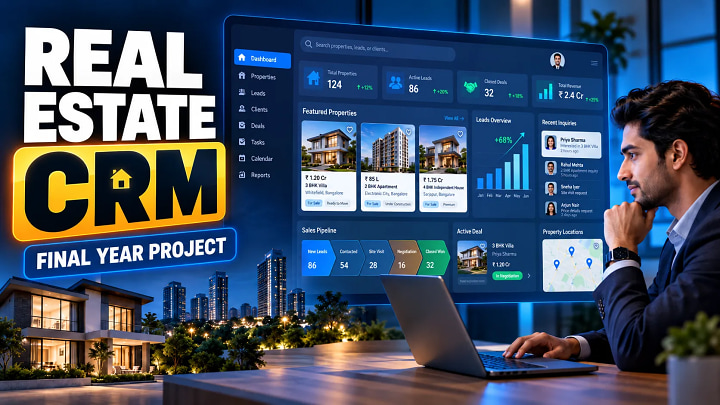
Real Estate CRM Final Year Project: Modules, MERN Architecture & Guide
A Real Estate CRM final year project is a practical full-stack application for managing property leads, sales employees, customer follow-ups, site visits and conversions. Unlike a basic property-listing website, it demonstrates business workflow, database design, authentication, role-based access, APIs, analytics and field-sales functionality within one system.
Quick Answer
A Real Estate CRM project manages the complete journey from new property inquiry to lead conversion.
A strong implementation should include:
- Secure role-based login
- Employee and lead management
- Lead assignment
- Follow-up history
- Property visit scheduling
- GPS-based visit verification
- Lead-status pipeline
- Notifications
- Dashboards and reports
- Activity and audit history
For a modern implementation, the MERN stack—MongoDB, Express.js, React.js and Node.js—is a strong option because it supports REST APIs, interactive dashboards and flexible CRM data structures.
What Is a Real Estate CRM Project?
CRM stands for Customer Relationship Management.
In real estate, a prospective buyer rarely submits an inquiry and immediately purchases a property. A sales team normally has to qualify the lead, understand budget and location preferences, make repeated follow-ups, recommend suitable properties, arrange a site visit and track the result.
A CRM stores this complete interaction history in a centralized system.
A typical workflow is:
Inquiry → Lead Assignment → Follow-Up → Qualification → Site Visit → Feedback → Negotiation → Converted/Lost
This makes the project considerably more useful than a simple property portal based mainly on CRUD operations.
Real Estate CRM vs Real Estate Management System
|
Area |
Real Estate CRM |
Real Estate Management System |
|
Primary focus |
Leads and customer relationships |
Properties and transactions |
|
Lead tracking |
Core feature |
Usually basic |
|
Follow-ups |
Detailed |
Limited |
|
Sales team management |
Important |
Optional |
|
Site visits |
Core workflow |
May only offer booking |
|
Property listings |
Supporting module |
Core module |
|
Sales pipeline |
Core feature |
Often limited |
|
Interaction history |
Detailed |
Usually basic |
Students can combine both concepts, but the project scope should remain manageable.
Core Modules of a Real Estate CRM
1. Authentication and Role-Based Access
Users should log in securely and receive access according to their responsibilities.
A realistic system can contain four roles:
Admin: employees, leads, visits, reports, settings and overall control.
Executive or Manager: team monitoring, lead assignment, pending follow-ups and conversion performance.
Inside Sales: customer calls, notes, lead qualification, follow-ups and visit scheduling.
Outside Sales: scheduled property visits, GPS check-in, visit notes, proof and completion status.
FileMakr's current Real Estate CRM implementation also uses Admin, Executive, Inside Sales and Outside Sales portals, making this four-role model suitable for demonstrating a realistic sales hierarchy.
Role and Permission Matrix
|
Module |
Admin |
Manager |
Inside Sales |
Outside Sales |
|
Employees |
Full |
Team view |
No |
No |
|
Leads |
Full |
Assign/review |
Assigned leads |
Visit-related |
|
Follow-ups |
View |
Review |
Add/update |
Limited |
|
Visits |
Full |
Review |
Schedule |
Execute |
|
Reports |
Full |
Team reports |
Own metrics |
Own visits |
|
Settings |
Full |
Limited |
No |
No |
Authorization must also be enforced on the server. OWASP recommends principles such as least privilege, deny by default and permission validation on every request, rather than relying only on hidden frontend menus.
Lead and Follow-Up Management
Every inquiry should become a structured lead.
Useful fields include customer name, phone, email, budget, preferred location, property type, lead source, assigned employee, status and next follow-up date.
Instead of using generic statuses such as Active and Inactive, create a proper pipeline:
New → Contacted → Interested → Visit Scheduled → Visited → Negotiation → Converted
Every call or interaction should also create a timestamped activity.
Example:
12 August — Customer contacted — Interested in 3BHK — Budget ₹80 lakh — Follow-up scheduled for Friday
This activity timeline demonstrates that the application is a CRM rather than just a database form.
Recommended MERN Architecture
A clean system architecture is:
React Frontend → Express/Node.js REST API → MongoDB Database
The React frontend can handle dashboards, lead tables, filters, forms, visit schedules and analytics.
The Node.js/Express backend can handle authentication, authorization, validation, lead assignment, visit APIs and reporting.
MongoDB can store users, employees, customers, leads, activities, visits, properties, notifications and attendance records.
JWT can be used as part of an authentication architecture; JSON Web Token is formally standardized by RFC 7519.
Real Estate CRM Database Design
Do not create isolated collections without defining relationships.
A practical relationship model is:
User → Employee → Lead → LeadActivity → Visit → Property
For example:
- Lead.assignedEmployeeId connects a lead with its salesperson.
- LeadActivity.leadId connects calls and follow-ups with the lead.
- Visit.leadId identifies the customer journey behind the visit.
- Visit.propertyId connects the visit with a property.
- Visit.assignedEmployeeId identifies the field salesperson.
Mongoose can be used to define schemas and validation rules when MongoDB is used with Node.js.
Keep customer details centralized instead of repeatedly copying names and phone numbers into several collections.
How GPS Site-Visit Verification Works
Geofencing can become one of the strongest technical features in the project.
A simple flow is:
Browser Location → Latitude/Longitude → REST API → Property Coordinates → Distance Check → Approve or Reject Check-In
The browser Geolocation API requires user permission and is restricted to secure contexts such as HTTPS in supporting browsers.
For MongoDB implementations, property locations can be stored as GeoJSON points with a 2dsphere index. MongoDB's geospatial functionality can then support proximity operations such as $nearSphere or $geoNear.
For example, a property may allow check-in only when the employee is within an approved radius.
The visit can then store the timestamp, coordinates, notes, completion status and optional proof.
Step-by-Step Implementation Guide
Step 1: Define the MVP
Start with:
Login → Employees → Leads → Assignment → Follow-Ups → Visits → Dashboard
Complete these modules before adding advanced functionality.
Step 2: Prepare the SRS
Document the problem statement, objectives, roles, functional requirements, non-functional requirements and limitations.
Step 3: Design the Database
Define collections, references, validation rules and indexes before developing the complete interface.
Step 4: Prepare Technical Diagrams
Include:
- ER diagram
- Use-case diagram
- DFD Level 0
- DFD Level 1
- Sequence diagram
- System architecture diagram
Step 5: Develop Authentication and Permissions
Implement password hashing, authentication tokens, backend authorization and input validation.
Step 6: Build the Lead Workflow
Implement actual lead-stage transitions and activity history rather than only CRUD operations.
Step 7: Connect Site Visits
Link the customer, lead, property and field employee through the visit module.
Step 8: Add Dashboards
Calculate total leads, due follow-ups, visits, conversions, losses and employee performance from database records rather than hard-coded values.
Step 9: Test Critical Workflows
|
Test |
Expected Result |
|
Invalid login |
Access rejected |
|
Sales user opens admin endpoint |
Access denied |
|
Duplicate customer phone |
Duplicate warning |
|
Lead assigned |
Employee receives lead |
|
Follow-up added |
Activity history updated |
|
Visit scheduled |
Field employee receives visit |
|
GPS outside permitted radius |
Check-in rejected |
|
Visit completed |
Visit and lead status updated |
Step 10: Prepare the Report and Viva
Your documentation should explain the problem, methodology, architecture, database, implementation, testing and results.
A strong project report should explain why the system behaves as it does, rather than containing only screenshots.
Viva Questions You Should Prepare
Why did you choose MongoDB instead of MySQL?
Explain how the choice matches your application's data model and development stack rather than simply saying MongoDB is faster.
What is the difference between authentication and authorization?
Authentication verifies identity; authorization determines what that authenticated user can access.
How do you stop one salesperson from accessing another salesperson's leads?
Explain server-side authorization and ownership checks.
How does GPS verification work?
Explain location permission, coordinates, server validation, site coordinates and radius checking.
Why is a CRM different from a property-listing website?
A CRM manages leads, interactions and the sales lifecycle; a listing portal primarily displays properties.
Common Mistakes to Avoid
Do not build a property portal and simply call it a CRM.
Avoid twenty incomplete modules when seven well-connected modules demonstrate the workflow better.
Never depend only on frontend role restrictions. Sensitive API endpoints require backend authorization.
Do not hard-code dashboard statistics.
Avoid duplicating customer data across collections.
Include testing evidence, especially for authentication, permissions, lead assignment and site-visit verification.
Expert Tips to Make the Project Stand Out
Add an activity timeline so the complete customer journey is visible.
Use filters for budget, source, assigned employee, project and lead stage.
Implement duplicate-lead detection using phone number or email.
Maintain an audit log for sensitive status or assignment changes.
For an advanced version, consider lead scoring, automatic lead assignment, reminders, WhatsApp integration or more detailed field-sales analytics.
During the viva, demonstrate one complete journey from inquiry to conversion instead of randomly opening different screens.
Frequently Asked Questions
Is Real Estate CRM a good final year project?
Yes. It can demonstrate full-stack development, authentication, database design, role permissions, workflows, dashboards, testing and location-based functionality.
Which technology is best for a Real Estate CRM project?
MERN is a strong modern option. PHP/MySQL, Django/PostgreSQL and other stacks can also work if they match your skills and requirements.
What are the main Real Estate CRM modules?
Common modules include employees, leads, customers, assignments, follow-ups, visits, properties, notifications, dashboards and reports.
Can BCA students build this project?
Yes. A smaller implementation can focus on authentication, customers, leads, follow-ups, visits and basic reports.
What diagrams should be included?
An ER diagram, use-case diagram, DFD Level 0/1, sequence diagram and architecture diagram provide strong coverage.
What database can be used?
MongoDB works naturally with MERN. MySQL or PostgreSQL are suitable when a relational architecture is preferred.
What can be added in future scope?
Possible enhancements include automated lead scoring, WhatsApp integration, mobile applications, advanced analytics, duplicate-lead detection and enhanced geofencing.
Conclusion
A Real Estate CRM final year project is strongest when it models a real sales process rather than behaving like another CRUD application.
Focus on the complete workflow:
Lead Capture → Assignment → Follow-Up → Property Visit → Verification → Negotiation → Conversion
Build the core modules first, design the relationships properly, secure every role, test critical workflows and prepare one complete customer journey for your viva.
Students who want to examine a working implementation can also explore FileMakr's Real Estate CRM project source code and Real Estate CRM final year project report to understand the implementation, documentation structure and project workflow before planning their own version.