Travel Agency Booking Platform Final Year Project | Source Code
LIMITED TIME
Get Source Code ₹99
Real project UI Full source included

No live demo yet — message us for access

Our team shares demo access on WhatsApp within minutes

Travel Agency Booking Platform Final Year Project

Complete final-year project source code with frontend, backend, database, and setup guide. Instant download after secure payment.

  • NODE-JS Stack
  • Instant Download
Secure CCAvenue payment Instant download link WhatsApp support

Choose your plan

Source Code Only

Full ZIP with frontend, backend, database & documentation.

₹99 one-time
  • Complete project source files
  • Database script included
  • How-to-run guide

What's in your download

Review features, setup steps, and credentials before you pay.

Project Overview

Description, tech stack, and what is included

Full source Frontend + backend
Database .sql file
Setup guide README included

Travel Agency MERN Platform is a full-stack travel and tour booking web application built using the MERN stack. The platform allows users to browse Indian destinations, view tour packages, search and filter tours, check itinerary details, book tours through a multi-step checkout process, submit reviews, manage bookings, view receipts, and cancel bookings where allowed. Admins get a dedicated admin panel to manage cities, tours, users, bookings, payments, and reviews.

The project includes a complete User Panel and Admin Panel. Users can access home, tours, tour details, checkout, booking details, destinations, destination details, login/signup, bookings, profile, and 404 pages. Admins can access dashboard statistics, user management, city CRUD, tour CRUD, booking/payment management, and review moderation.

This project is suitable for B.Tech, M.Tech, BCA, MCA, BE, ME, BSc, and MSc students who need a practical final year project, major project, or minor project based on travel agency management, tour booking, destination management, booking checkout, dummy payment, reviews, admin dashboard, MERN stack development, JWT authentication, MongoDB database design, and REST API implementation. FileMakr can provide this project with source code, project report, documentation, and setup support for academic submission.

Technical snapshot

Project
Travel Agency Booking Platform Final Year Project
Stack
NODE-JS
Includes
Code, DB, README
License
Academic submission
Secure CCAvenue payment · Instant download · Need help? WhatsApp us

Admin Features

Modules and controls available to administrators

  • Secure admin login in this final year project
  • Admin role-based access
  • Dedicated dark sidebar admin layout
  • Admin dashboard
  • View users count
  • View tours count
  • View cities count
  • View bookings count
  • View reviews count
  • View paid orders count
  • View total revenue
  • View pending booking count
  • View confirmed booking count
  • View refunded amount
  • View recent bookings table
  • View customer name
  • View booking amount
  • View booking status
  • View payment status
  • Quick action shortcuts
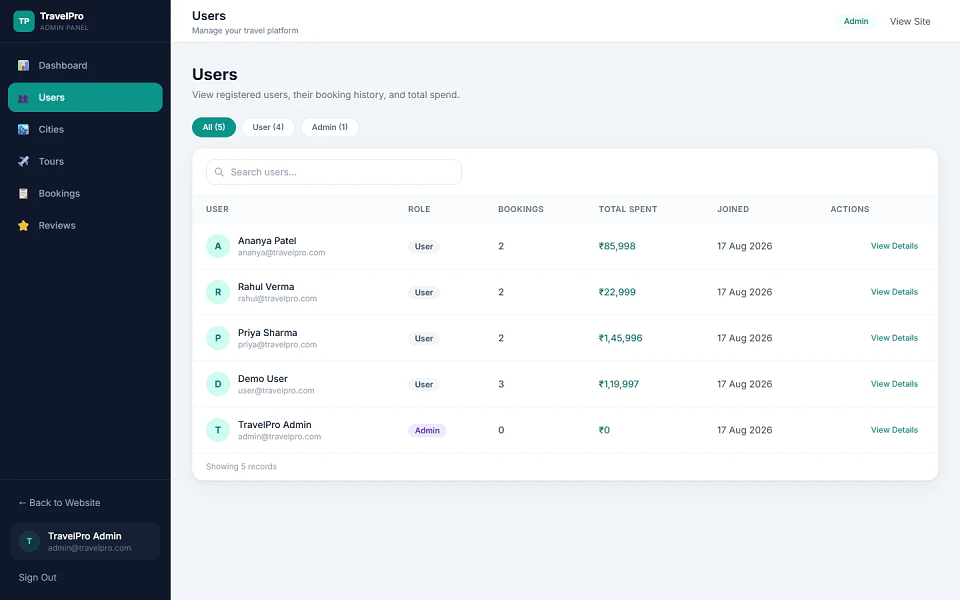
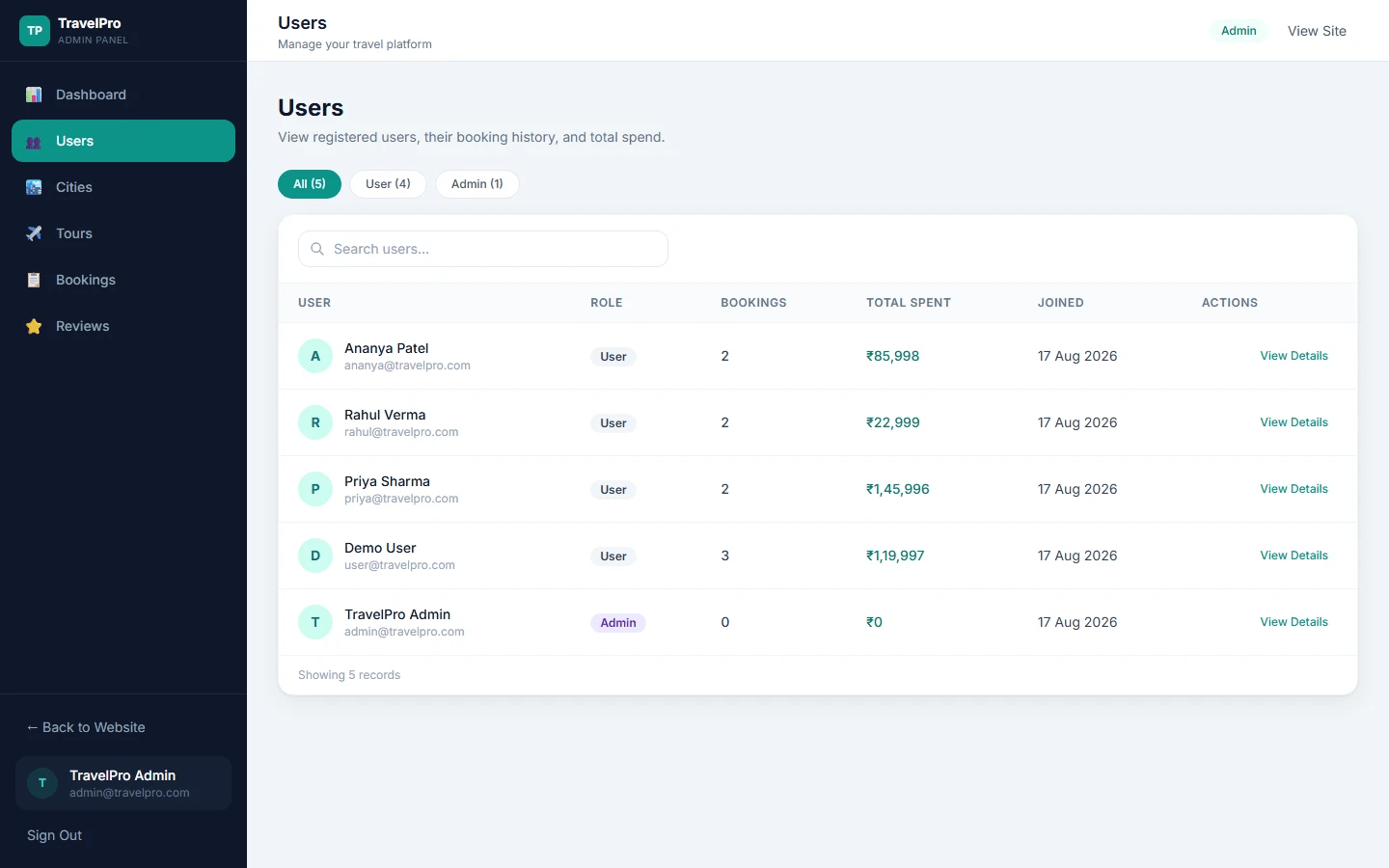
  • Users management
  • List all users
  • View booking count per user
  • View total spent in INR
  • Search by name
  • Search by email
  • Search by role
  • Filter by role
  • Open user detail modal
  • View user profile
  • View booking history
  • View spend summary
  • Cities management
  • Create city
  • Add city name
  • Add country
  • Add image URL
  • View searchable city table
  • View city image preview
  • Update city through modal form
  • Delete city with confirmation dialog
  • Tours management
  • Create tour
  • Add tour title
  • Generate auto-slug
  • Select city
  • Add description
  • Add INR price
  • Add duration
  • Set featured flag
  • Add tour images
  • Add itinerary
  • View searchable tour table
  • View tour image
  • View city
  • View price
  • View rating
  • View featured status
  • Update tour fields through modal
  • Delete tour with confirmation
  • Preview live tour page
  • Booking and payment management
  • View revenue summary
  • Filter by booking status
  • Filter by payment status
  • Search by tour
  • Search by customer
  • Search by phone
  • Search by transaction ID
  • Open manage modal
  • View full booking details
  • Update booking status
  • Update payment status
  • Cancel booking as admin
  • View admin booking detail page
  • View full receipt
  • View customer information
  • Perform admin actions
  • Auto-refund when cancelled if previously paid
  • Review moderation
  • View all reviews from every tour
  • View rating statistics
  • View total reviews
  • View average rating
  • View 5-star count
  • Search by tour
  • Search by reviewer
  • Search by comment
  • Delete inappropriate reviews
  • Recalculate tour ratings after review deletion

The admin panel includes dashboard, users, cities CRUD, tours CRUD, bookings/payments management, and reviews moderation

User Features

What end users can do in this application

  • User registration in this final year project
  • User login
  • User logout
  • JWT-based session
  • Role-based access
  • Home page
  • Hero section with call-to-action
  • Platform stats
  • Feature highlights
  • Featured tours grid
  • Popular destinations grid
  • Signup CTA section
  • Tours page
  • Browse all tour packages
  • Search by tour name
  • Filter by destination city
  • Featured-only toggle
  • Sort by price
  • Sort by rating
  • Sort by duration
  • View tour cards
  • View tour image
  • View city
  • View duration
  • View rating
  • View INR price
  • Tour details page
  • Image gallery with thumbnail selection
  • Full tour description
  • Day-by-day itinerary
  • Average rating
  • Review count
  • Read reviews
  • Submit review after login
  • Booking sidebar
  • Select departure date
  • Select number of travelers
  • View total price in INR
  • Proceed to checkout
  • Checkout page
  • Protected checkout route
  • 3-step checkout flow
  • Confirm trip details
  • Enter contact information
  • Add phone number
  • Add special requests
  • Select dummy payment method
  • Card payment option
  • UPI payment option
  • Net Banking payment option
  • Generate booking confirmation
  • Generate payment receipt
  • Redirect to booking details
  • Booking details page
  • View full booking receipt
  • View transaction ID
  • View payment method
  • View paid-at timestamp
  • View tour summary
  • View departure information
  • Cancel pending or confirmed booking
  • Automatic refund status after cancellation
  • Destinations page
  • View city grid
  • View city cover images
  • View tour count per destination
  • Open destination-specific tour listing
  • Destination detail page
  • View city hero banner
  • View all tours in selected city
  • View empty state when no tours exist
  • My Bookings page
  • View user bookings
  • View tour image
  • View title and dates
  • Filter bookings by all, pending, confirmed, completed, cancelled
  • View status badges
  • View total price in INR
  • View payment status
  • View details link
  • Profile page
  • View name
  • View email
  • View role
  • Quick links to bookings and tours
  • Admin quick link if admin
  • Sign out
  • 404 branded page

The user panel includes home, tours, tour details, checkout, booking details, destinations, destination details, login/signup, my bookings, profile, and 404 modules.

Other Features

Additional capabilities included in the project

Booking and Payment Features in this final year project

  • Multi-step checkout
  • Protected checkout access
  • Trip detail confirmation
  • Contact information collection
  • Dummy payment gateway
  • Card payment method
  • UPI payment method
  • Net Banking payment method
  • Test card support
  • Booking confirmation
  • Payment receipt generation
  • Booking detail page
  • Transaction ID display
  • Payment method display
  • Paid-at timestamp
  • Booking cancellation
  • Refund status update
  • Admin booking cancellation
  • Payment status management
  • Auto-refund on cancellation where applicable

The checkout flow includes trip details, contact information, and dummy payment through Card, UPI, or Net Banking.


Other Features

  • Full-stack MERN architecture
  • React 18 frontend
  • Vite 5 build tool
  • React Router 6
  • Tailwind CSS 3
  • Axios with JWT interceptor
  • Context API for global auth state
  • Node.js backend
  • Express 4 REST API
  • MongoDB database
  • Mongoose 8 ODM
  • JWT authentication with 7-day expiry
  • bcryptjs password hashing
  • express-validator request validation
  • CORS support
  • Morgan HTTP request logging
  • dotenv environment configuration
  • User and admin roles
  • Protected routes
  • Admin guards
  • INR currency formatting
  • Responsive UI for user and admin panels
  • Demo Indian destination dataset
  • Demo users, reviews, and bookings
  • Seed scripts
  • Deployment support for backend and frontend

The technology stack includes React, Vite, React Router, Tailwind CSS, Axios, Context API, Node.js, Express, MongoDB, Mongoose, JWT, bcryptjs, express-validator, CORS, Morgan, and dotenv.


Technology Used

Layer Technology
Frontend React 18
Build Tool Vite 5
Routing React Router 6
Styling Tailwind CSS 3
API Client Axios
State Management Context API
Backend Node.js, Express 4
Database MongoDB
ODM Mongoose 8
Authentication JWT
Password Security bcryptjs
Validation express-validator
Middleware CORS, Morgan
Environment dotenv
Currency INR formatting
Roles User, Admin

How to Run

Step-by-step setup on your laptop or PC

Step 1: Open Folder

cd travel-agency-mern-admin-crud

Step 2: Backend setup


cd server

npm install

cp .env.example .env

Update server/.env with:


MONGO_URI=mongodb://localhost:27017/travel_agency

JWT_SECRET=your-secret-key

CLIENT_URL=http://localhost:5173

[email protected]

ADMIN_PASSWORD=Admin@123

PORT=5000

NODE_ENV=development


Step 3: Seed the database


npm run seed:reset


Step 4: Frontend setup


cd ../client

npm install

cp .env.example .env

Default client environment:


VITE_API_URL=http://localhost:5000/api

The setup instructions include backend installation, environment setup, seed reset, frontend installation, and local API URL configuration.


Run the Project

Terminal 1 — Backend


cd server

npm run dev

Or production mode:


npm start

API runs at:


http://localhost:5000

Terminal 2 — Frontend


cd client

npm run dev

App runs at:


http://localhost:5173

The project runs backend and frontend in two terminals during local development.

Login Credentials

Default demo accounts for testing after setup

Available after running:


npm run seed:reset

Admin Login

Field Value
URL http://localhost:5173/admin
Email [email protected]
Password Admin@123

Demo User Login

Password for all demo users:


User@123

Name Email Use Case
Demo User [email protected] General testing, has 2 bookings
Priya Sharma [email protected] Has bookings and reviews
Rahul Verma [email protected] Has bookings and reviews
Ananya Patel [email protected] Has bookings and reviews

The README also provides a quick test flow for admin management, checkout using test card, reviews, and cancellation.


License

Usage terms for academic and personal projects

Related Tags

Search terms and categories for this source code

Travel Agency Booking Platform Final Year Project Source Code Final Year NODE-JS Project Ready-to-Run Code With Database File Plagiarism-Free Faculty Approved Travel Agency Booking Platform TravelPro project travel booking system project tour booking management system MERN stack travel agency project MongoDB Express React Node project final year project major project minor project source code project report travel agency website source code tour package booking system Indian destinations booking project hotel travel booking project admin panel travel project destination management system booking checkout project travel review system college project source code